One place for customer inquiries
Keep each lead’s name, phone number, email and relevant contact details together instead of scattered across notes and messages.
A simple lead follow-up tracker for plumbers, HVAC pros, electricians and other small service businesses. Keep customer inquiries, estimate notes and next follow-up dates together — without setting up a complex CRM. See who needs attention today, on your phone or computer.
See how the app works, then create your account in the VARELIOX Lead App. No invitation request or manual approval is needed to open the sign-up screen.
Watch a real walkthrough of the Lead App interface, from adding a customer inquiry to organizing follow-ups, updating statuses, importing leads and exporting your data.
90-second product walkthrough · English narration · fictional example leads. The on-screen example is a demonstration, not a promise of results. Create your account in the app, verify your email, and sign in to start using it.
▶ Press play to watch · English captions available
VARELIOX is a customer inquiry tracking app for small service businesses. It helps you organize the work after someone calls, messages or asks for an estimate: save the contact, capture the conversation, set the next follow-up and record the outcome.
Keep each lead’s name, phone number, email and relevant contact details together instead of scattered across notes and messages.
Use the Today view to check which prospects need your attention and decide who to contact next.
Update each opportunity from New and Contacted to Follow-up, Won or Lost, so your pipeline stays easy to understand.
Search your saved leads by name, phone number, email or status when a customer gets back in touch.
Record what the customer requested, what you discussed and the next useful action in the same lead record.
Give an open inquiry a next follow-up date rather than relying on memory after a job or estimate.
Record an estimated job value when you know it, or leave it unknown instead of guessing.
Move leads from a CSV or Excel spreadsheet into the app, so you do not need to start by typing every contact.
Download your lead data when you need a copy, a handoff or a backup for your own records.
Access your account through a web browser at the office or between service visits. Signed-in data is designed to sync.
Open in-app help to understand the lead list, statuses, import and export tools as you get started.
Handle the essentials — contacts, dates, follow-ups and outcomes — without adopting an entire field-service or sales platform.
Start with the leads you already have. Keep a clearer daily follow-up list, without switching your scheduling, billing or customer messaging tools.
VARELIOX does not automatically create new customer leads, send follow-up SMS messages, or replace invoicing and scheduling software. You decide when and how to contact each customer.
Different trades receive different kinds of calls, but the follow-up problem is familiar: a customer wants an estimate or repair, you get busy, and the next call slips your mind. Use a straightforward follow-up tracker for the inquiries your business already receives.
Save plumbing repair inquiries and quote requests with customer details, notes and a date to call back. Check your follow-up list between jobs.
Keep AC service requests, replacement-estimate inquiries and next contact dates visible when the phone is busy.
Record who asked for an electrical quote, what was discussed and whether the opportunity is still open or won.
Keep inspection inquiries, callback commitments and open quotes in one customer follow-up list.
Organize incoming service requests and track when you promised to contact each prospect again.
Use a simple CRM alternative when a spreadsheet or scattered phone notes have become difficult to keep up to date.
Keep the customer name and contact details, requested service, notes from the last conversation, current lead status and next follow-up date. If an estimated job value is known, you can record that too. Then check the Today list and update the outcome after you make contact.
For a step-by-step explanation, read our free guide on how to track customer leads without a CRM, or watch the 90-second Lead App walkthrough.
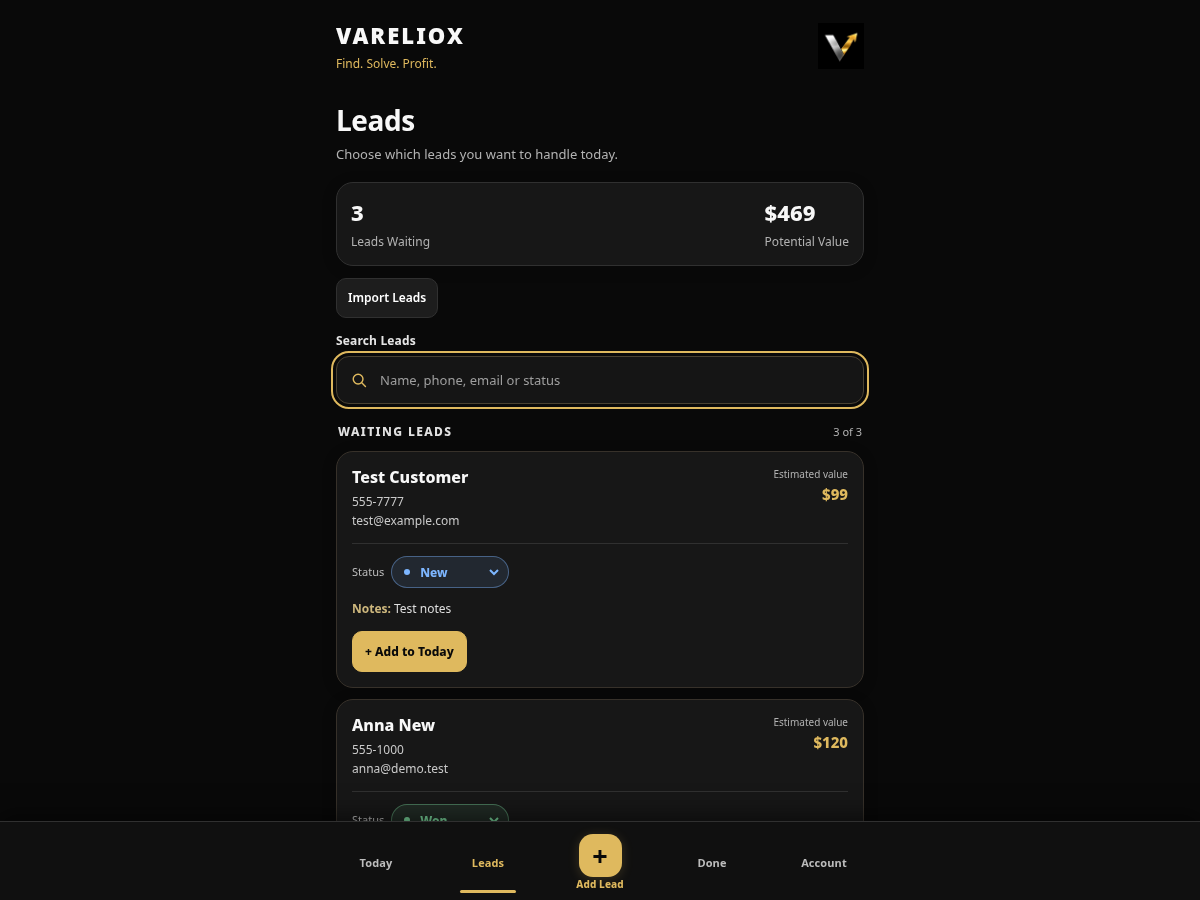
A sample of the updated interface. These images contain fictional demo leads and are not customer results.
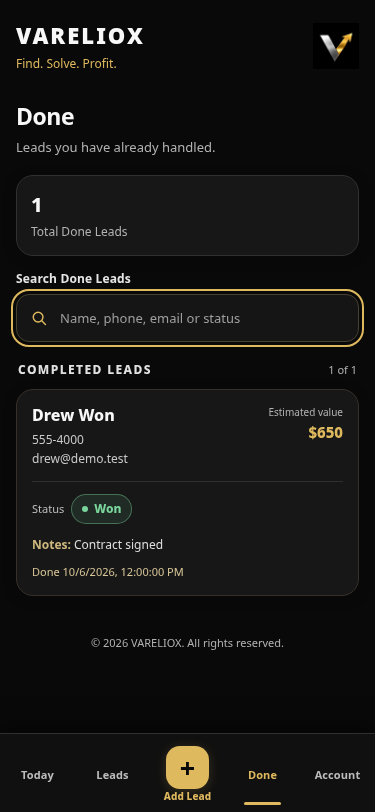
Save a new inquiry with its contact details, or import contacts from an existing list.
Keep priority conversations visible, set a follow-up and update the lead's status.
See which leads you contacted, are following up with, won or lost.
Not ready for an app? Start with our free, practical guide: how to track customer leads and follow-ups without a complex CRM.
Ready to try VARELIOX? Open the real Lead App, create your account and verify your email. Then sign in and start tracking leads and follow-ups.
You'll go directly to app.vareliox.net. On the sign-in screen, select Create Account.
Start My Free TrialYou'll create your account securely inside the VARELIOX Lead App, not in a form on this website. You may be asked to verify your email before signing in. Privacy Policy.
Your experience can help another small business owner decide if VARELIOX is right for them. We welcome honest feedback — positive or negative.
We publish reviews only after confirming that the person has actually used the Lead App and has permitted us to share their words.
Some reviewers may have received a free trial. Reviews are voluntary, and positive feedback is never required.
For people who have already used the VARELIOX Lead App.
It's designed for small service businesses and solo operators who need a simple CRM alternative for tracking customer inquiries and follow-ups — without a complicated sales system.
Save each customer inquiry in a single lead list. Include contact details, notes and the next follow-up date, then update its status when you call back or receive a decision. VARELIOX focuses on these everyday steps without requiring a full sales or field-service setup.
Yes. A plumber can track repair requests and estimates, while an HVAC contractor can organize service inquiries and callbacks. The app tracks customer conversations and next steps; it does not automatically dispatch technicians, send estimates or book jobs.
Yes. You can record a positive estimated job value when known, keep notes and update the lead status to reflect whether the opportunity is new, contacted, due for follow-up, won or lost.
No. VARELIOX is for organizing inquiries your business already receives. You choose when to call, text or email customers using your normal communication tools.
Yes. The Lead App includes an export option for your saved leads so you can keep a copy. CSV is supported; check the available export format in your account.
Yes. The app is web-based, and the current version supports phone and desktop access with cloud syncing when signed in.
Yes. You can bring an existing CSV contact list into the app; Excel import is available when supported by the browser and its file-reading library. Review your fields and sample records before confirming an import.
Select “Start My Free Trial” to open the VARELIOX Lead App. Choose “Create Account”, enter your details, verify your email and sign in. You do not need to send us a separate access request.
No. You do not need a credit card to create your account or start your free trial. There is no automatic billing.
Account registration and lead data are handled by the Lead App. See our Privacy Policy, or ask us at contact@vareliox.net.